Markdown 語法示例
Vuepress Markdown
快速上手markdown
Heading (h2)
h3
h4
h5
h6
代碼
## Heading (h2)
### h3
#### h4
##### h5
###### h6
鏈結
内部鏈結
網站內部的鏈接,將會被轉換成 <router-link> 用於 SPA 導航。同時,站內的每一個文件夾下的 README.md 或者 index.md 文件都會被自動編譯為 index.html,對應的鏈接將被視為 /。
以如下的文件結構為例:
.
├─ README.md
├─ foo
│  ├─ README.md
│  ├─ one.md
│  └─ two.md
└─ bar
   ├─ README.md
   ├─ three.md
   └─ four.md
假設你現在在 foo/one.md 中:
[Home](/) <!-- 跳轉到根部的 README.md -->
[foo](/foo/) <!-- 跳轉到 foo 文件夾的 index.html -->
[foo heading](./#heading) <!-- 跳轉到 foo/index.html 的特定標題位置 -->
[bar - three](../bar/three.md) <!-- 具體文件可以使用 .md 結尾(推薦) -->
[bar - four](../bar/four.html) <!-- 也可以用 .html -->
鏈結的重定向
VuePress 支持重定向到乾淨鏈接。如果一個鏈接 /foo 找不到,VuePress 會自行尋找一個可用的 /foo/ 或 /foo.html。反過來,當 /foo/ 或 /foo.html 中的一個找不到時,VuePress 也會嘗試尋找另一個。
注意
無論是否使用了 permalink 和 clean-urls 插件,你的相對路徑都應該依賴於當前的文件結構來定義。在上面的例子中,即使你將 /foo/one.md 的路徑設為了 /foo/one/,你依然應該通過 ./two.md 來訪問 /foo/two.md。
外部鏈結
外部的鏈接將會被自動地設置為 target="_blank" rel="noopener noreferrer":
你可以自定義通過配置 config.markdown.externalLinks 來自定義外部鏈接的特性。
行內程式碼
const a = 1
代碼
`const a = 1`
徽章 tip warning danger tip middle
代碼
<Badge text="tip" />
<Badge text="warning" type="warning" />
<Badge text="danger" type="danger" />
<Badge text="tip middle" vertical="middle" />
任務列表
- [ ] Mercury
- [x] Venus
- [x] Earth (Orbit/Moon)
- [x] Mars
- [ ] Jupiter
- [ ] Saturn
代碼
- [ ] Mercury
- [x] Venus
- [x] Earth (Orbit/Moon)
- [x] Mars
- [ ] Jupiter
- [ ] Saturn
圖片 (點擊 放大/縮小)
代碼

行內圖片
Not Bad.
分隔線
Below is a <hr>, I guess.
Above is a <hr>, I guess.
代碼
Below is a `<hr>`, I guess.
---
Above is a `<hr>`, I guess.
列表
無序列表
list item
list item
list item
list item
list item
list item
代碼
+ list item

+ list item

  - list item
  - list item

    + list item

    + list item
有序列表
list item
list item
list item
代碼
1. list item
2. list item
3. list item
表格
GitHub 風格的表格
| Tables        | Are           | Cool  |
| ------------- |:-------------:| -----:|
| col 3 is      | right-aligned | $1600 |
| col 2 is      | centered      |   $12 |
| zebra stripes | are neat      |    $1 |
代碼
| Tables        | Are           | Cool  |
| ------------- |:-------------:| -----:|
| col 3 is      | right-aligned | $1600 |
| col 2 is      | centered      |   $12 |
| zebra stripes | are neat      |    $1 |
長表格
| Sun With Face | Grinning Face | Smiling Face | Grinning Face With Big Eyes | Smiling Face With Smiling Eyes | Full Moon Face | Grinning Face With Smiling Eyes | Face With Monocle | Cowboy Hat Face | Thinking Face | Face Vomiting |
|---|---|---|---|---|---|---|---|---|---|---|
| 🌞 | 😀 | ☺️ | 😃 | 😊 | 🌝 | 😄 | 🧐 | 🤠 | 🤔 | 🤮 |
| 🌞 | 😀 | ☺️ | 😃 | 😊 | 🌝 | 😄 | 🧐 | 🤠 | 🤔 | 🤮 |
| 🌞 | 😀 | ☺️ | 😃 | 😊 | 🌝 | 😄 | 🧐 | 🤠 | 🤔 | 🤮 |
塊狀引文
要麼是酒,要麼是女人,要麼是神,家族,王,夢想,子女,力量,人如果不沈醉於某些東西估計都撐不下去吧,所有人都是某些東西的奴隸,就連那傢伙...
-- 凱尼?阿克曼 《進擊的巨人》
代碼
> 要麼是酒,要麼是女人,要麼是神,家族,王,夢想,子女,力量,人如果不沈醉於某些東西估計都撐不下去吧,所有人都是某些東西的奴隸,就連那傢伙...
程式碼
代碼塊
// 第 3 版規範的最終設計
try {
  doSomething();
} catch (e) {
  if (e == "thing")
    console.log("a thing")
  else if (e == 42)
    console.log("42")
  else {
    console.log(e);
    throw e; // 重新 throw
  }
} finally {
  cleanup();
}
代碼
``` js
// 第 3 版規範的最終設計
try {
  doSomething();
} catch (e) {
  if (e == "thing")
    console.log("a thing")
  else if (e == 42)
    console.log("42")
  else {
    console.log(e);
    throw e; // 重新 throw
  }
} finally {
  cleanup();
}
```
代碼群組
yarn add -D vuepress-theme-gungnir@next
npm install -D vuepress-theme-gungnir@next
代碼
<CodeGroup>
<CodeGroupItem title="YARN" active>

```bash
yarn add -D vuepress-theme-gungnir@next
```

</CodeGroupItem>

<CodeGroupItem title="NPM">

```bash
npm install -D vuepress-theme-gungnir@next
```

</CodeGroupItem>
</CodeGroup>
代碼塊中的行高亮
export default {
  data () {
    return {
      msg: 'Highlighted!'
    }
  }
}
代碼
``` js{4}
export default {
  data () {
    return {
      msg: 'Highlighted!'
    }
  }
}
```
除了單行以外,你也可指定多行,行數區間,或是兩者都指定。
- 行數區間: 例如
{5-8},{3-10},{10-17} - 多個單行: 例如
{4,7,9} - 行數區間與多個單行: 例如
{4,7-13,16,23-27,40}
export default { // Highlighted
  data () {
    return {
      msg: `Highlighted!
      This line isn't highlighted,
      but this and the next 2 are.`,
      motd: 'VuePress is awesome',
      lorem: 'ipsum',
    }
  }
}
代碼
``` js{1,4,6-8}
export default { // Highlighted
  data () {
    return {
      msg: `Highlighted!
      This line isn't highlighted,
      but this and the next 2 are.`,
      motd: 'VuePress is awesome',
      lorem: 'ipsum',
    }
  }
}
```
行號
你可以通過配置來為每個代碼塊顯示行號:
// .vuepress/config.js -> markdown

module.exports = {
  markdown: {
    lineNumbers: true
  }
}
圖表
Chart.js
代碼
```chart
{
  "type": "bar",
  "data": {
    "labels": ["Red", "Blue", "Yellow", "Green", "Purple", "Orange"],
    "datasets": [{
      "label": "# of Votes",
      "data": [12, 19, 3, 5, 2, 3],
      "backgroundColor": [
        "rgba(255, 99, 132, 0.2)",
        "rgba(54, 162, 235, 0.2)",
        "rgba(255, 206, 86, 0.2)",
        "rgba(75, 192, 192, 0.2)",
        "rgba(153, 102, 255, 0.2)",
        "rgba(255, 159, 64, 0.2)"
      ],
      "borderColor": [
        "rgba(255, 99, 132, 1)",
        "rgba(54, 162, 235, 1)",
        "rgba(255, 206, 86, 1)",
        "rgba(75, 192, 192, 1)",
        "rgba(153, 102, 255, 1)",
        "rgba(255, 159, 64, 1)"
      ],
      "borderWidth": 1
    }]
  },
  "options": {
    "scales": {
      "y": {
        "ticks": {
          "beginAtZero": true,
          "callback": "function(value){ return value + 'k'; }"
        }
      }
    }
  }
}
```
Mermaid
代碼
```mermaidjs
sequenceDiagram
  Alice->John: Hello John, how are you?
  loop Every minute
    John-->Alice: Great!
  end
```
Maths
Inline math:
Display math:
With tags:
代碼
Inline math: $E = mc^2$

Display math:

$$
i\hbar\frac{\partial \psi}{\partial t} = \frac{-\hbar^2}{2m} ( \frac{\partial^2}{\partial x^2} + \frac{\partial^2}{\partial y^2} + \frac{\partial^2}{\partial z^2} ) \psi + V \psi.
$$

With tags:

$$
\begin{gather}
  A = \text{softmax}(\frac{QK^T}{\sqrt{d_k}}) \\
  F_{\text{out}} = A V
\end{gather}
$$
Emoji
🎉 💯
代碼
:tada: :100:
你可以在這個列表找到所有可用的 Emoji。
自定義容器 默認主題
輸入
::: tip
這是一個提示
:::

::: warning
這是一個警告
:::

::: danger
這是一個危險警告
:::

::: details
這是一個詳情塊,在 IE / Edge 中不生效
:::
輸出
提示
這是一個提示
注意
這是一個警告
警告
這是一個危險警告
這是一個詳情塊,在 IE / Edge 中不生效
你也可以自定義塊中的標題:
::: danger STOP
危險區域,禁止通行
:::

::: details 點擊查看代碼
```js
console.log('你好,VuePress!')
```
:::
STOP
危險區域,禁止通行
點擊查看代碼
console.log('你好,VuePress!')
參考:
導入代碼段 beta
你可以通過下述的語法導入已經存在的文件中的代碼段:
<<< @/filepath
它也支持 行高亮:
<<< @/filepath{highlightLines}
輸入
<<< @/blog/.vuepress/__tests__/snippet.js{2}
输出
<<< @/blog/.vuepress/tests/snippet.js{2}
注意
由於代碼段的導入將在 webpack 編譯之前執行,因此你無法使用 webpack 中的路徑別名,此處的 @ 默認值是 process.cwd()。
為了只導入對應部分的代碼,你也可運用 VS Code region。你可以在文件路徑後方的 # 緊接著提供一個自定義的區域名稱(預設為 snippet )
輸入
<<< @/blog/.vuepress/__tests__/snippet-with-region.js#snippet{1}
代碼文件
<<< @/blog/.vuepress/tests/snippet-with-region.js
輸出
<<< @/blog/.vuepress/tests/snippet-with-region.js#snippet{1}
進階配置
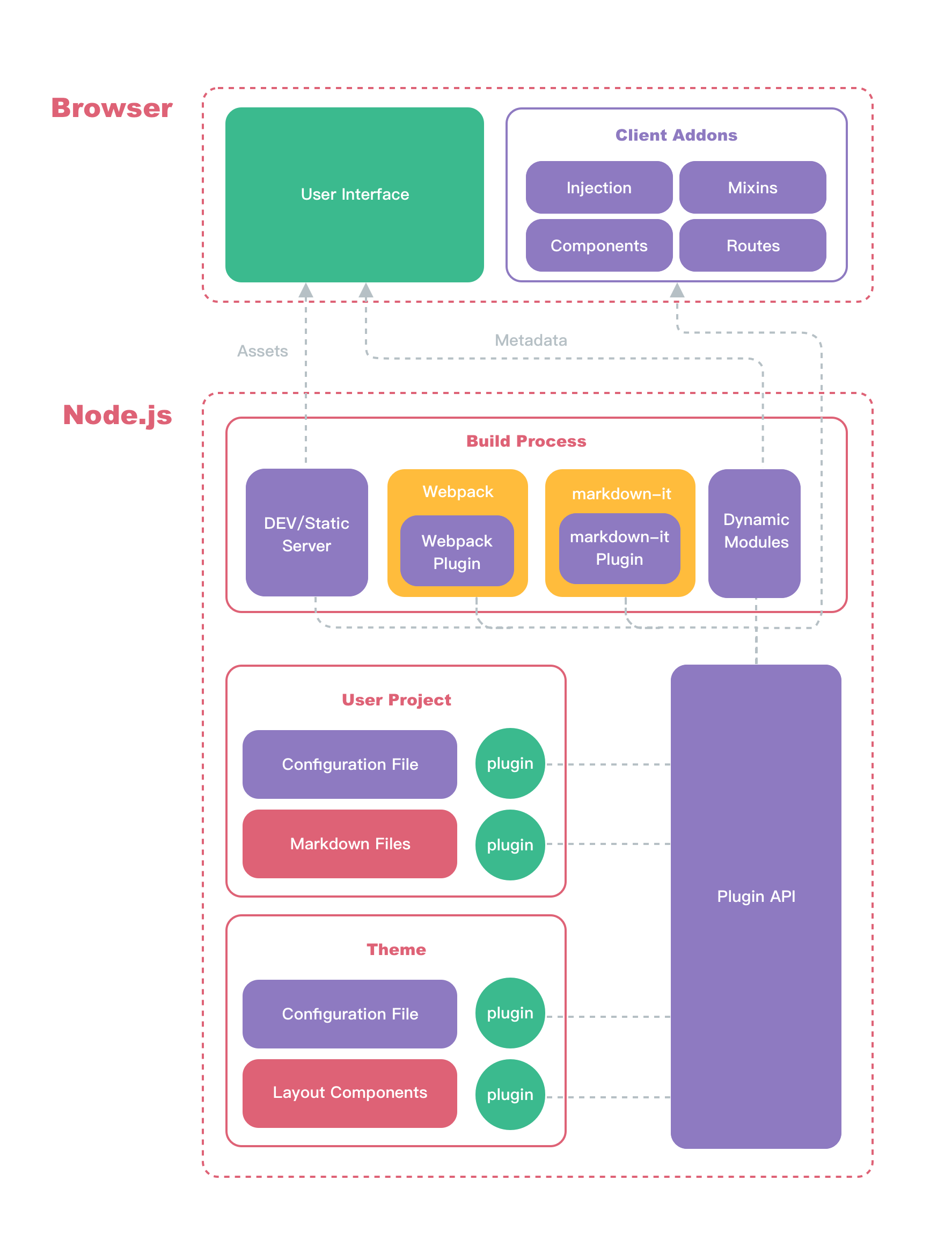
VuePress 使用 markdown-it 來渲染 Markdown,上述大多數的拓展也都是通過自定義的插件實現的。想要進一步的話,你可以通過 .vuepress/config.js 的 markdown 選項,來對當前的 markdown-it 實例做一些自定義的配置:
module.exports = {
  markdown: {
    // markdown-it-anchor 的選項
    anchor: { permalink: false },
    // markdown-it-toc 的選項
    toc: { includeLevel: [1, 2] },
    extendMarkdown: md => {
      // 使用更多的 markdown-it 插件!
      md.use(require('markdown-it-xxx'))
    }
  }
}
- Heading (h2)
- h3
- h4
- h5
- 鏈結
- 内部鏈結
- 鏈結的重定向
- 外部鏈結
- 行內程式碼
- 徽章
- 任務列表
- 圖片 (點擊 放大/縮小)
- 行內圖片
- 分隔線
- 列表
- 無序列表
- 有序列表
- 表格
- GitHub 風格的表格
- 長表格
- 塊狀引文
- 程式碼
- 代碼塊
- 代碼群組
- 代碼塊中的行高亮
- 行號
- 圖表
- Chart.js
- Mermaid
- Maths
- Emoji
- 自定義容器
- 導入代碼段
- 進階配置